≡ Menu

5pm-to-email two-way integration

5pm-to-email two-way integration

Imagine, getting an email from a client and creating a task from it without quitting your email client! That’s exactly what you will be able to do with 5pm project manager with the new two-way email integration. And, besides, getting email notification from 5pm, you can also communicate back by simply sending emails to 5pm. You can add new tasks, assign teams, send attachments, comments and even report progress. Check more about it: here.

You can register your own 5pm account and try it for 14 days for free: www.5pmweb.com.

Mac OS X tip

5pm supports many browsers and platforms including Safari (on Mac and Windows) so, here is a tip for our Mac OS clients. Fluid creates a desktop wrapper for your favorite web based apps (5pm) and provides a “desktop” application icon.

http://www.fluidapp.com/

“Fluid gives any webapp a home on your Mac OS X desktop complete with Dock icon, standard menu bar, and logical separation from your other web browsing activity.”

header.png

Widescreens are welcome

5pm Video Tutorial

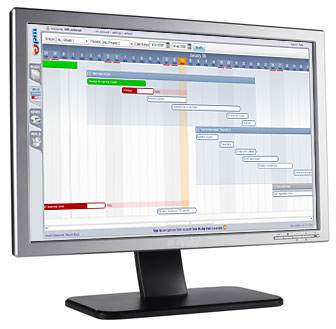
Our 5pm project management service, while designed to fit into most popular screen sizes, still takes full advantage of bigger screens and higher resolutions. It also works great with the new and popular widescreen format. There are a couple of things that make it possible:

1. Dual-panel layout takes the maximum advantage of the horizontal space, especially in combination with (2)…

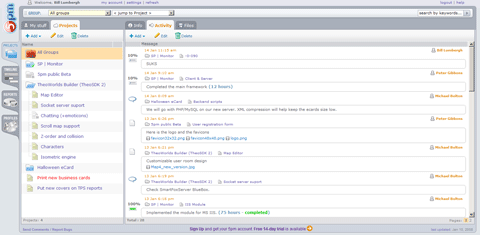
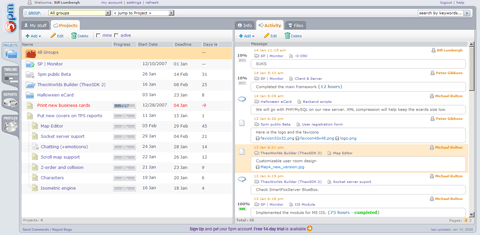
2. Customizable interface – you can resize the panels and even show/hide/resize columns inside those panels, creating your own layouts. Here is an example of two different 5pm layouts:

5pm widescreen layout example

Check more on interface customization in our short video tutorial “Customizing the Interface”.

3. Timeline view is a natural fit for widescreens due to its horizontal layout.

Almost 40% of our 5pm users have widescreens.

Do you have a widescreen monitor? If not, there is a big chance that you own a widescreen TV. Nearly 30% of all LCDs are widescreens.

Websites are traditionally developed with a vertical layout in mind. The majority use fixed width designs, that fit into smaller resolution screens – the most common ones (800×600 used to be the standard, now it’s 1024×768). The rest of us, with newer and bigger screens, are a minority. Our higher-then-average resolution usually comes with empty space around web pages. While you are reading this blog, you are most likely enjoying the nice blank space on both sides of this article. Join the club.

With widescreens things became even worse. Once again, those who have bigger screens and higher resolution, and now, a widescreen format, don’t gain much from this extra horizontal space. Because of that, it became a common practice to open the browser in a smaller window on the side, and use the rest of the screen space for other applications.

Sure, there are websites with “liquid” layout (full screen width), but those come with the long-text-lines problem, and, once again, widescreens are the ones that suffer the most.

With widescreens gaining more popularity, the UI layouts will adjust too, especially for web applications, favoring customizable horizontal designs. It will be interesting to watch this trend evolving.

Meanwhile, check 5pm demo – widescreens are welcome.

VentureBeat

VentureBeat.com published a nice article about 5pm.

Here is a snippet:
“…I found the software much simpler and easier to use than some of the others (including industry leader Basecamp, which I use). You don’t have to hunt for your projects and tasks; everything’s right there, pretty much one click away.

…definitely project management made easy.” [ read the whole article ]

Two new 5pm Video Tutorials

5pm Video Tutorial

Two new Video Tutorials were added to 5pm website:

To register your 5pm free 14-day trial, visit www.5pmweb.com

If you are a nonprofit or an educational institution looking for a project management solution – contact us directly at support (at) 5pmweb.com. We can offer you a special discount up to 50%.


Need a project management tool for your business? 5pm is a next generation web-based project management tool. It’s flexible and simple to use. Give it a try at www.5pmweb.com.

Opera 9 support added to 5pm

5 pm now supports Opera 9(Mac and PC).

5pm is a next generation project management tool. Register for your free 14-day trial at https://www.5pmweb.com.

We just added some new features to 5pm:

  • RSS support – now you can get the updates on projects and tasks directly to your RSS reader
  • Time zones – users can choose their time zone
  • Email notifications updated
  • A dozen of other small things…

For all our American users: have a happy Thanksgiving!

5pm is a next generation project management tool. Register for your free 14-day trial at https://www.5pmweb.com.

5pm Video Introduction

5pm Video TutorialA 2-minute video tutorial was just added to our website. It covers the basics of the 5pm interface and is designed to help new users.
We plan to create more video tutorials in the future.

Safari 3 support added to 5pm

Safari 3Today we added support for the latest Apple Safari 3 browser (both Mac and PC) to 5pm.

Need a project management tool for your business? 5pm is a next generation web-based project management tool. It’s flexible and simple to use. Give it a try at www.5pmweb.com.