
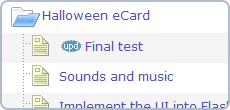
 Today we added a new status icon – “updated” – in addition to the “new” one. Now you will be able to distinguish between newly created items and the updated ones.
5pm update: “updated” status icon added
Next post: 5pm Wishes You Happy Holidays!
Previous post: 5pm update: Progress Notes details added to the Time Report
Great addition. The next very useful feature in this category would be for these icons to disappear after they have been viewed.
>Dan. They disappear when you log out. How would you define “have been viewed”? From the browser perspective.
Hi,
Those on our team who have desktop machines or laptops they leave at their desk never log out. So these icons stay put. From the browser perspective, if there was a way to clear the icon after the item had been viewed (clicked on) that would be cool. On this same subject, I notice that if the project is not expanded, there is no immediate hint that it might contain an item that is new. “View all new/updated” items might be a great filter to have.
Better yet, a tab next to the projects tab that shows all new items (with a preference to show all new things in the last hour/day/week). I have hundreds of tasks associated with lots of ongoing projects. Trying to filter things down to what is urgent, new, important, etc. is something that would be very helpful.